
STOP CHATTING.
START DOING.
Build, connect and orchestrate intelligent AI agents powered by local models.
Turn conversational models into autonomous assistants that execute terminal tools, inspect codebases, cross-reference documents, and delegate tasks to each other.
How MX Harness Works
From raw prompt generation to verifiable task completion in your local sandbox.
Tool Calling
Equip agents with local terminal commands, file read/write, code formatting, and web inspection tools.
Multi-Agent Teams
Form teams where a coordinator breaks complex requirements into sub-tasks and delegates to specialized agents.
MX Studio Link
Hooks natively into MX Studio's OpenAI-compatible server (localhost:8080) for instant zero-latency inference.
Sandboxed Safety
Every bash command or script runs in an isolated workspace with human-in-the-loop authorization gates.
Inside the Agent Workspace
Explore authentic screenshots from MX Harness running locally, powered by MX Studio.
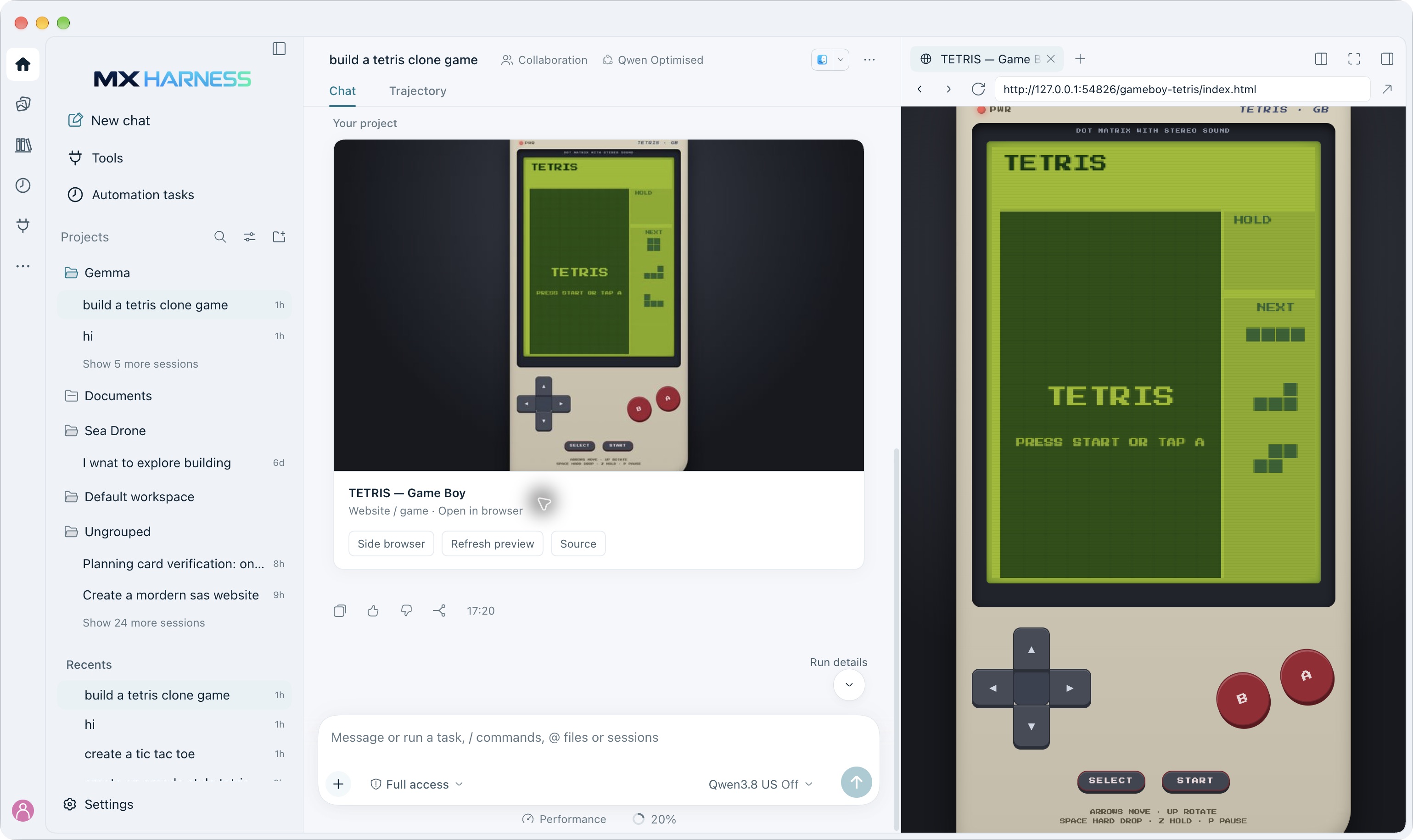
Autonomous Agents & Live Sandbox Preview
Watch agents reason, call tools, and execute real code in an interactive sandbox. The live browser preview renders the agent's output — from a Tetris clone to working apps — right inside the workspace.
- Full reasoning trace with every tool call logged inline
- Interactive sandbox renders generated code in real time
- Human-in-the-loop authorization before destructive actions
- Streaming responses with structured intermediate state
Optimized Agent Presets
MX Harness is free to download. Premium presets are optional in-app upgrades containing tuned model routing, specialized tool configurations, and memory strategies.
Coding Agent Pro
Autonomous Refactoring, Testing & Debugging
Inspects local repositories, plans architectural refactors, executes unit test suites, and verifies syntax before committing code.
Analyze Issue → Propose Refactor → Run Tests → Format Patch
Project Context Cache + File Tree Index
AUTONOMOUS AGENTS, LOCAL BY DESIGN.
MX Harness agents can execute tools, read files, and run terminal commands inside a local sandbox on your Mac. For fully local workflows, the only model endpoint is your own MX Studio server on localhost. Note that web tools and connected services may still require internet and transmit data to third parties.
- Prompts and documents sent to remote servers for processing
- Retention and training use governed by provider policies and configurations
- Service outages and rate limits when the network drops
- Often involves usage-based or subscription costs
- Your data governed by a third party's terms
- Core inference runs on your hardware during on-device processing
- No conversation-content telemetry, no advertising profiles
- Supported local workflows keep working without internet
- No per-token cloud inference charges for fully local processing
- Greater control over your locally stored knowledge and memory
On-Device Processing
Core AI inference runs on your Apple Silicon CPU, GPU, or Neural Engine. Prompts and completions for supported local workflows are processed on your hardware rather than relayed to a remote inference provider.
Local Storage
Imported documents, memory, and knowledge bases are stored inside your device's private application sandbox, protected by applicable device security and encryption settings.
Sandboxed Execution
Every terminal command and file operation runs in an isolated workspace with human-in-the-loop authorization gates. Agents act only with explicit permission.
You Hold the Keys
No account lock-in and no silent data syncing for local data. Where supported, you can export or delete your locally stored data on your terms — the intelligence stays under your control.
Cloud providers may offer strong security and privacy protections, and local processing is not a substitute for standard device security. Protect devices with passcodes, encryption, updates, and backups. Connected tools and external services may still require internet and transmit data to third parties.
Agents that work on your most sensitive code — with core inference kept local for supported workflows.
BUILD YOUR FIRST LOCAL AI AGENT
Step-by-step handbook on configuring autonomous tool-calling agents with local models.
Stop chatting with AI and start giving it real work. This guide walks through building agents that call tools, run workflows, and use models served by MX Studio on your own Mac.
Get Your Free Starter Kit
Delivered to your email when our system confirms your request
5-Stage Educational Follow-up Funnel
Every lead receives a thoughtful sequence designed to educate and convert into an engaged customer.